PSPad editor怎么设置插入模式光标为区块

 时间:2026-02-12 07:27:28

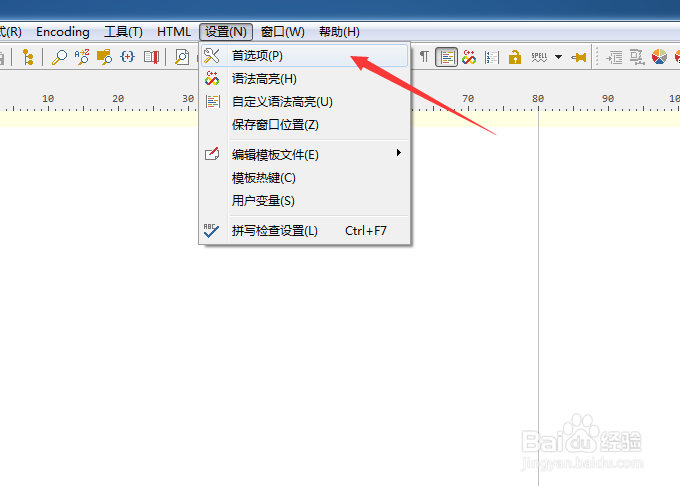
1、点击菜单中的设置菜单

PSPad editor怎么设置插入模式光标为区块

2、弹出了下拉菜单选中为首选项

PSPad editor怎么设置插入模式光标为区块

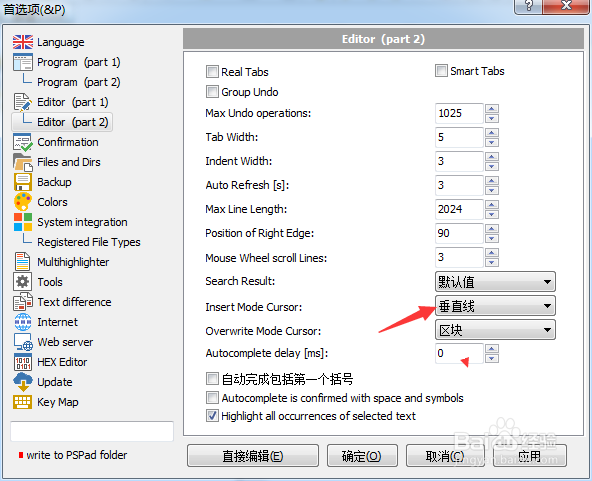
3、点击左侧中editor选项

PSPad editor怎么设置插入模式光标为区块

4、点击insert mode cursor选项

PSPad editor怎么设置插入模式光标为区块

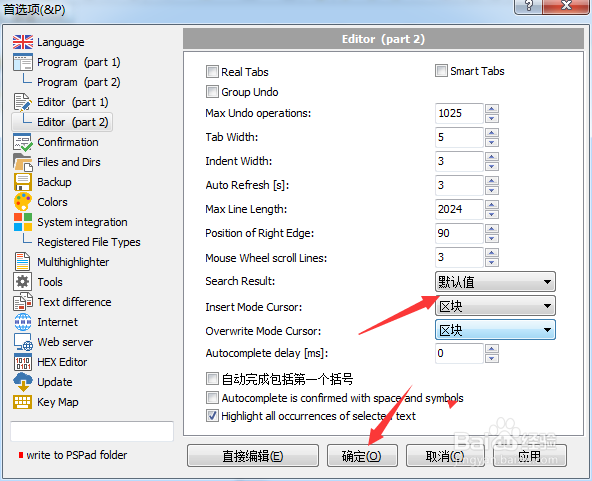
5、弹出了选择为区块选项

PSPad editor怎么设置插入模式光标为区块

6、选择为区块选项之后,点击确定

PSPad editor怎么设置插入模式光标为区块

  • PSPad editor怎么设置始终使用这个文件类型
  • PSPad editor怎么设置覆盖模式光标为水平线
  • PSPad editor怎么设置集成脚本支持
  • PSPad editor怎么设置循环浏览书签
  • PSPad editor怎么设置搜索结果为默认值
  • 热门搜索
    新乡旅游网 洛阳旅游网官网 贵州铜仁旅游 嘉峪关旅游景点大全 世界旅游胜地有哪些 郴州东江湖旅游攻略 现在去哪旅游最合适 牡丹江旅游景点大全 北京周边 旅游 北京昌平旅游景点