PSPad editor怎么设置搜索结果为置中

 时间:2026-02-12 00:38:16

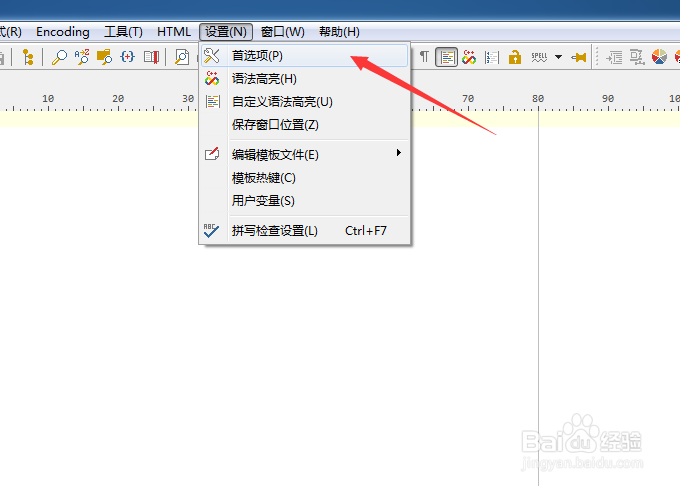
1、点击菜单中的设置菜单


PSPad editor怎么设置搜索结果为置中

2、弹出了下拉菜单选中为首选项


PSPad editor怎么设置搜索结果为置中

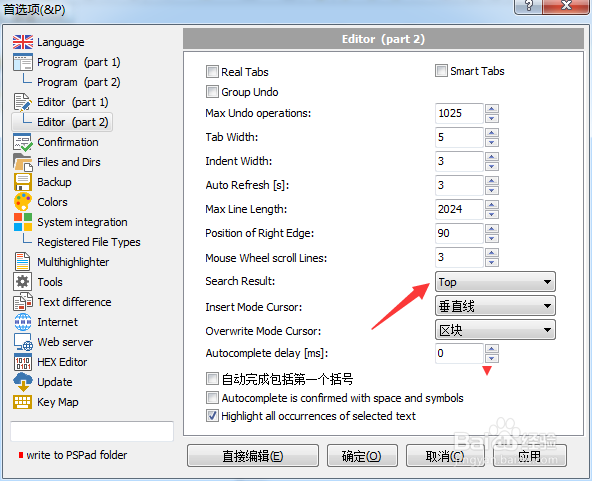
3、点击左侧中editor选项


PSPad editor怎么设置搜索结果为置中

4、点击search result选项

PSPad editor怎么设置搜索结果为置中

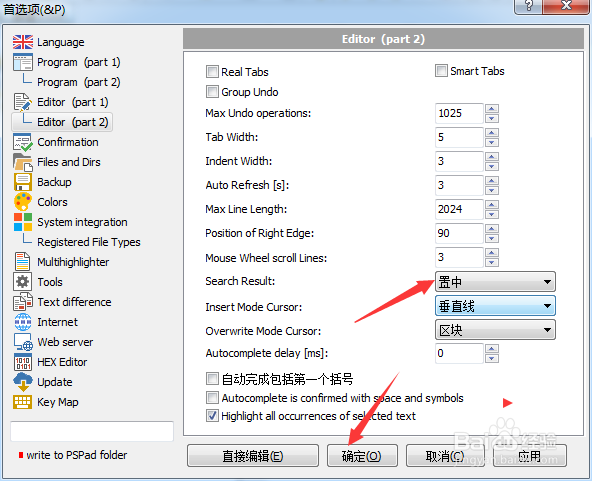
5、弹出了下拉菜单选择为置中

PSPad editor怎么设置搜索结果为置中

6、选择为置中之后,点击确定

PSPad editor怎么设置搜索结果为置中

  • PSPad editor怎么设置覆盖模式光标为水平线
  • PSPad editor怎么设置搜索结果为默认值
  • PSPad editor怎么设置自动完成延迟为1
  • PSPad editor怎么设置插入模式光标为区块
  • PSPad editor怎么设置循环浏览书签
  • 热门搜索
    兰州旅游景点大全 大溪地旅游报价 邮轮旅游网 淄博旅游景点大全 淄博旅游景点 泉州旅游攻略 阿里旅游 欧洲性旅游 河南旅游年票 秦皇岛旅游景点