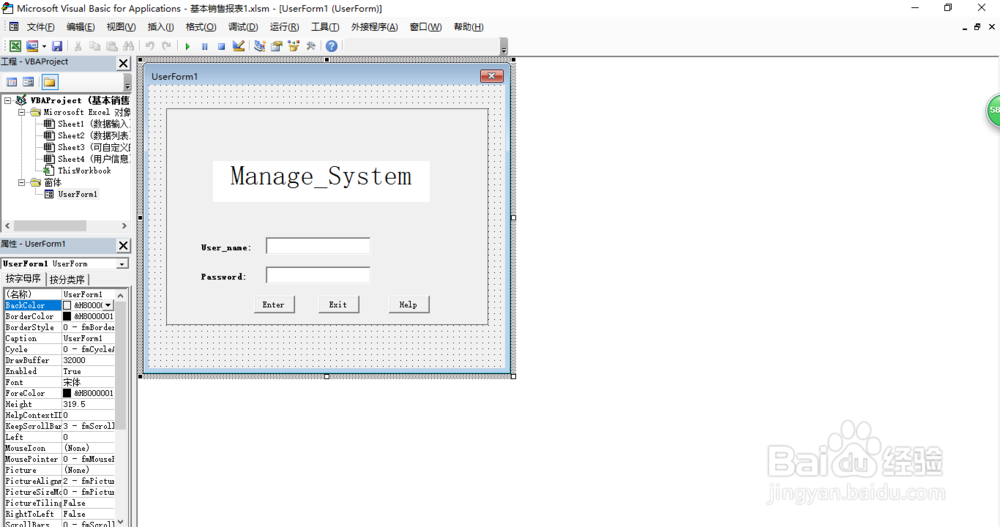
1、设计窗体
窗体为标志label3个;按钮button3个;文本域textbox2个;并为响应的组件
设置tooltip工具提示。背景图片一张,使用loadpicture()函数载入图片
设置图片自动填满,label背景为空,即0。
Private Sub UserForm_Activate()
Image1.Visible = True
Image1.Picture = LoadPicture("C:\Users\jyjh\Desktop\main.jpg")
Image1.AutoSize = False
Image1.PictureSizeMode = fmPictureSizeModeStretch
Label1.BackStyle = 0
Label2.BackStyle = 0
Label3.BackStyle = 0
End Sub

2、设置按钮功能
Private Sub CommandButton1_Click()
If TextBox1.Text = "admin" And TextBox2.Text = "123" Then
UserForm1.Hide
Application.Visible = True
MsgBox "Login_successfully! "
Else
MsgBox "Error,please try again!"
End If
Private Sub CommandButton2_Click()
ThisWorkbook.Close
End Sub
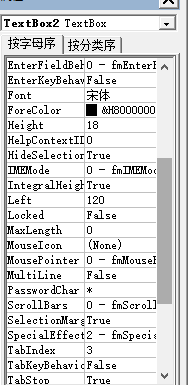
password文本域设置为passwchar *用于隐藏输入字符。
3、模拟打开登录:


