如何打开IE11的enterprise Mode

 时间:2026-02-14 01:07:52

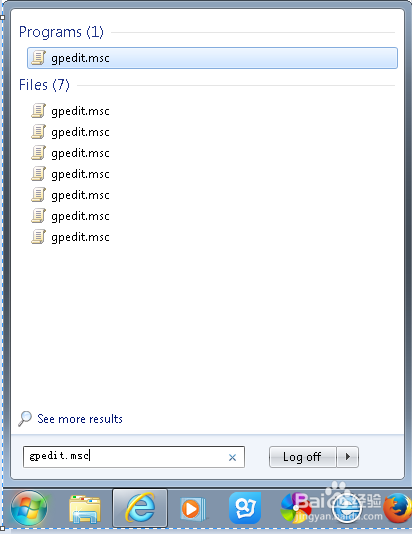
1、首先在开始菜单输入gpedit.msc,打开组策略编辑器
如何打开IE11的enterprise Mode

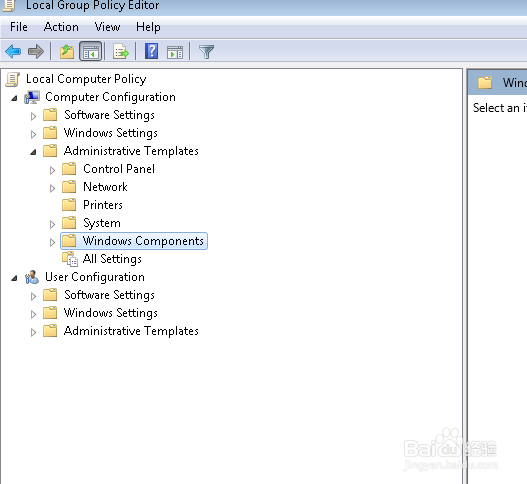
2、打开computer configuration

如何打开IE11的enterprise Mode

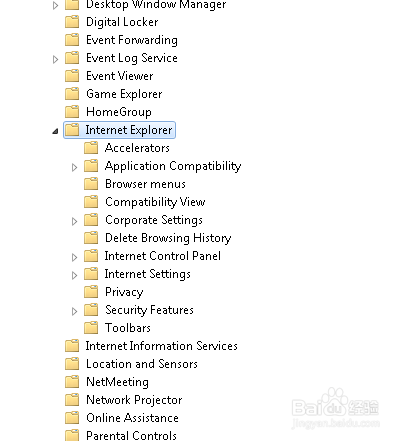
3、依次打开administrative templates--》windows components--》Internet explorer
如何打开IE11的enterprise Mode

如何打开IE11的enterprise Mode

4、在右侧下拉菜单,最后找到use enterprise Mode,双击打开

如何打开IE11的enterprise Mode

5、选择enable,点击ok确定,关闭编辑器

如何打开IE11的enterprise Mode

6、打开IE11,tool菜单,看enterprise Mode出来了,如果有的网站无法打开,那么就选择一下enterprise Mode看看,

如何打开IE11的enterprise Mode

  • rm命令如何在删除文件时排除忽略某特定文件
  • Windows11 IP地址怎么查看方法
  • 教大家使用Axure制作手机充话费效果
  • 在IE浏览器如何启用ActiveX控件?
  • 查看端口_查看端口命令_如何查看网站服务器端口
  • 热门搜索
    青岛 旅游 跟团旅游网 宁波旅游网 宜兰旅游攻略 青岛旅游报价 国内旅游公司 旅游风光 长海县旅游 旅游胜地图片 十一旅游推荐