1、双击图标运行软件:
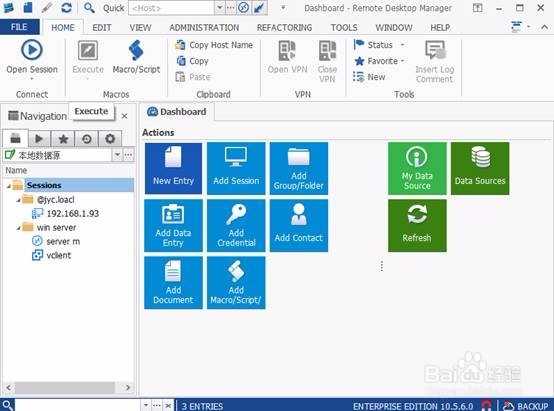
2、鼠标切换到file选项卡:

3、找到左侧的option选项按钮:

4、单击option选项按钮:
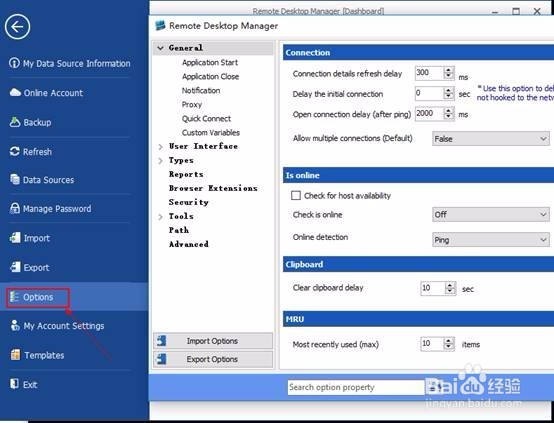
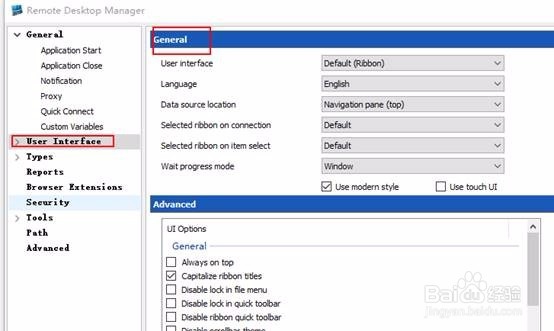
5、在弹出窗口单击展开 user interface按钮,右侧会弹出General设置界面:
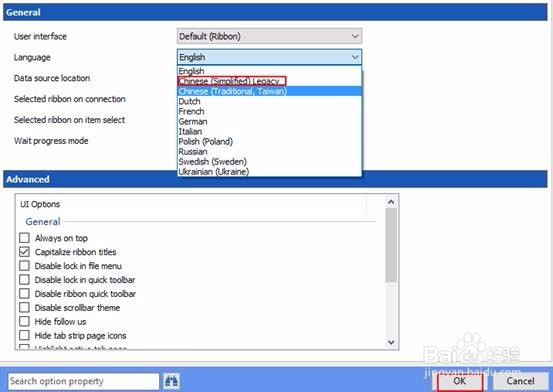
6、在Lnaguage 右侧下拉列表找到简体中文,单击OK选项:
7、重启软件,就可看到中文界面的界面了:

时间:2026-04-23 23:13:09
1、双击图标运行软件:
2、鼠标切换到file选项卡:
3、找到左侧的option选项按钮:
4、单击option选项按钮:
5、在弹出窗口单击展开 user interface按钮,右侧会弹出General设置界面:
6、在Lnaguage 右侧下拉列表找到简体中文,单击OK选项:
7、重启软件,就可看到中文界面的界面了:
