PSPad editor怎么关闭智能字符完成

 时间:2026-02-18 05:26:01

1、首先,点击菜单中的设置菜单,弹出了下拉菜单选中为选项

PSPad editor怎么关闭智能字符完成

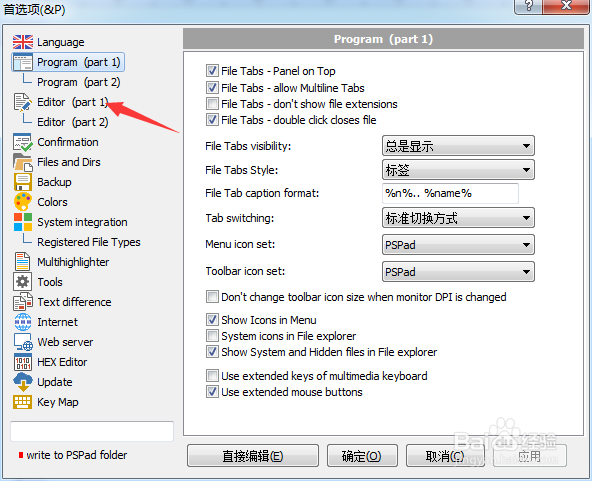
2、点击左侧中editor选项

PSPad editor怎么关闭智能字符完成

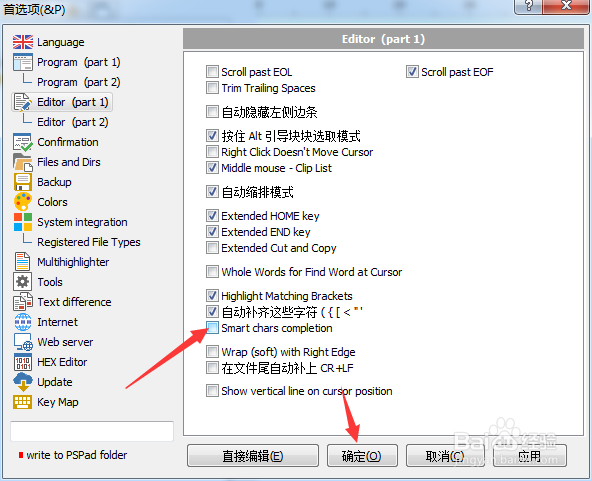
3、去掉勾选上智能字符完成选项

PSPad editor怎么关闭智能字符完成

4、去掉勾选上智能字符完成选项之后,点击确定

PSPad editor怎么关闭智能字符完成

  • PSPad editor怎么关闭记住文件状态
  • PSPad editor怎么关闭只有一个程序实例
  • PSPad editor怎么关闭自动缩排模式
  • PSPad editor怎么关闭扩展端键
  • PSPad editor怎么关闭自动保存窗口位置
  • 热门搜索
    泰国自由行旅游攻略 东欧旅游 丽江自助旅游攻略 黄姚古镇旅游攻略 丽江旅游局 山西旅游景点地图 安徽绩溪旅游 黔西南旅游 斯里兰卡旅游攻略 拉脱维亚旅游