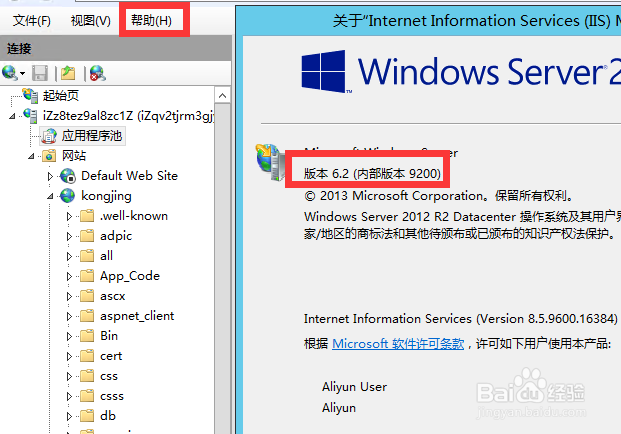
1、正常情况下如果iis是7.0 或7.5版本,应该不存在这个问题。打开服务器查看一下iis是6.2版本。
2、对需要伪静态站点进行设置。
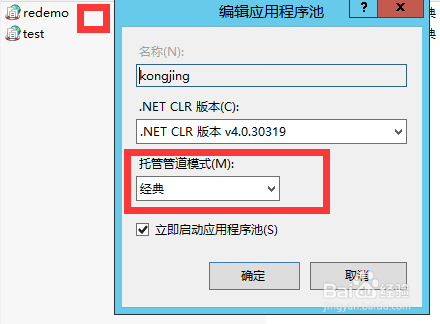

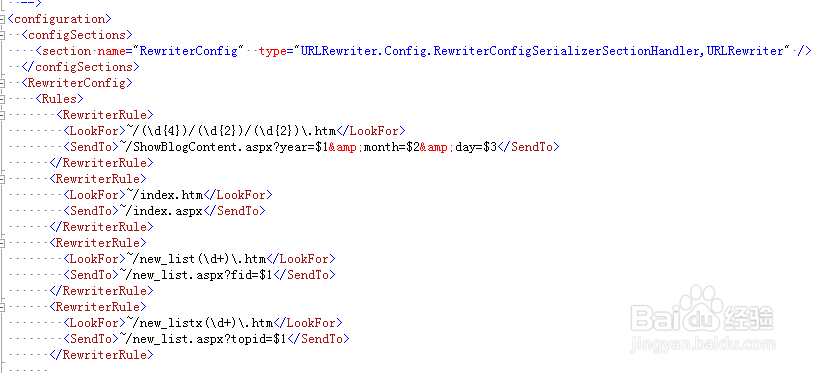
3、其次项目的webconfig进行设置。1,
<configSections>
<section name="RewriterConfig" type="URLRewriter.Config.RewriterConfigSerializerSectionHandler,URLRewriter" />
</configSections>
<RewriterConfig>
<Rules>
<RewriterRule>
<LookFor>~/(\d{4})/(\d{2})/(\d{2})\.htm</LookFor>
<SendTo>~/ShowBlogContent.aspx?year=$1&month=$2&day=$3</SendTo>
</RewriterRule>
</Rules>
</RewriterConfig>
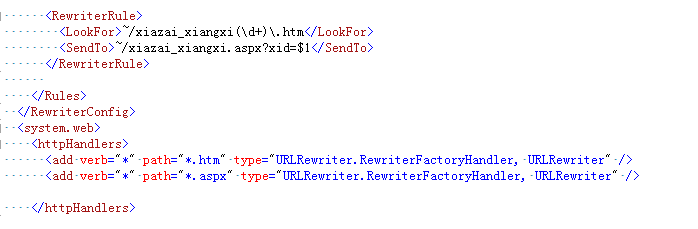
2,
<httpHandlers>
<add verb="*" path="*.htm" type="URLRewriter.RewriterFactoryHandler, URLRewriter" />
<add verb="*" path="*.aspx" type="URLRewriter.RewriterFactoryHandler, URLRewriter" />
</httpHandlers>
3,
<system.webServer>
<handlers>
<add name="aspnethtml" path="*.htm" verb="GET,POST" modules="IsapiModule" scriptProcessor="C:\Windows\Microsoft.NET\Framework\v4.0.30319\aspnet_isapi.dll" resourceType="Unspecified" preCondition="classicMode,runtimeVersionv4.0,bitness32" />
<add name="aspnetzangdalei" path="*.aspx" verb="GET,POST" modules="IsapiModule" scriptProcessor="C:\Windows\Microsoft.NET\Framework\v4.0.30319\aspnet_isapi.dll" resourceType="Unspecified" preCondition="classicMode,runtimeVersionv4.0,bitness32" />
</handlers>
</system.webServer>

4、项目bin 文件夹引入 UrlRewriter.dll 文件,最后访问一下配置路径,是否和真是路径一致。

