如何设置GOMPlayer窗口使用磁铁功能

 时间:2024-10-14 19:21:10

1、点击“GOMPlayer”

如何设置GOMPlayer窗口使用磁铁功能

2、在“GOMPlayer”窗口中,点击“设置”

如何设置GOMPlayer窗口使用磁铁功能

3、在“设置”窗口中,点击“播放”

如何设置GOMPlayer窗口使用磁铁功能

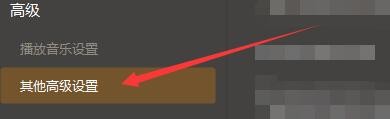
4、在“播放”窗口中,点击“其他高级设置”

如何设置GOMPlayer窗口使用磁铁功能

5、在“其他高级设置”窗口中,点击“窗口使用磁铁功能”

如何设置GOMPlayer窗口使用磁铁功能

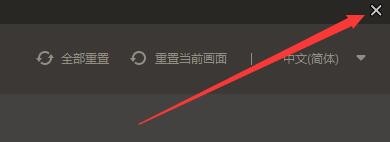
6、点击“关闭”窗口即可

如何设置GOMPlayer窗口使用磁铁功能
  • 如何设置GOMPlayer当运行时自动切换为全屏窗口
  • 如何设置GOMPlayer启用强调声音过滤器功能
  • 如何设置GOMPlayer向上滚动鼠标滚轮加大声音
  • 如何设置GOMPlayer在任务栏图标中显示播放率
  • 如何设置GOMPlayer启用360度VR功能
  • 热门搜索
    北京旅游局官网 张家界旅游必去景点 欧洲旅游地图 广州旅游区 旅游媒体 广之旅旅游网 防城港旅游景点 旅游资源的开发与保护 威海旅游地图 永定土楼旅游攻略