1、查看磁盘是否映射成功
[root@Server3 ~]# fdisk -l
映射成功,两块磁盘

2、执行mpathconf –enable 在/etc下生成配置文件
[root@Server3 ~]# mpathconf --enable

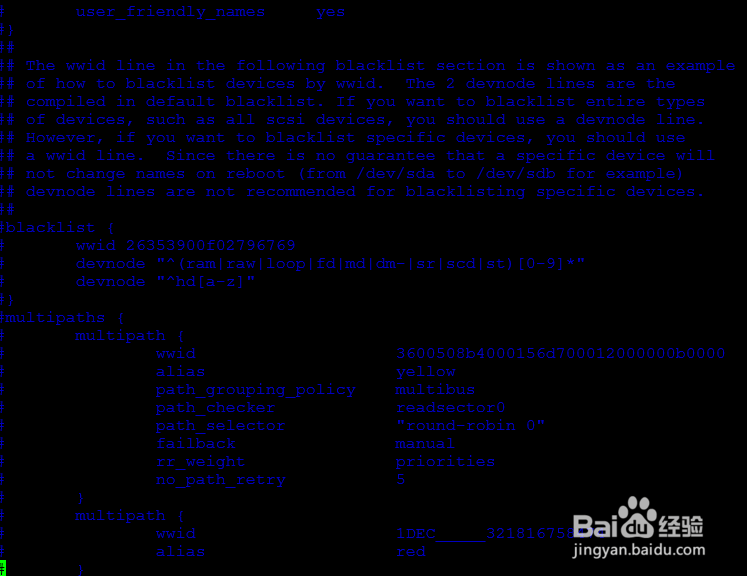
3、查看multipath.conf配置文件中的语句是否注释掉
[root@Server3 ~]# vim /etc/multipath.conf

4、启动multipathd服务
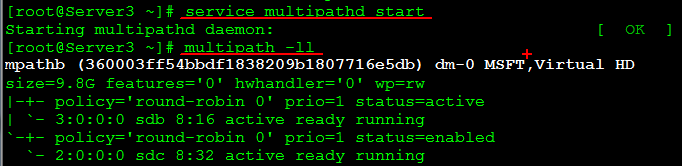
[root@Server3 ~]# service multipathd start
Starting multipathd daemon: [ OK ]
[root@Server3 ~]# multipath -ll
mpathb (360003ff54bbdf1838209b1807716e5db) dm-0 MSFT,Virtual HD
size=9.8G features='0' hwhandler='0' wp=rw
|-+- policy='round-robin 0' prio=1 status=active
| `- 3:0:0:0 sdb 8:16 active ready running
`-+- policy='round-robin 0' prio=1 status=enabled
`- 2:0:0:0 sdc 8:32 active ready running
5、再来一次
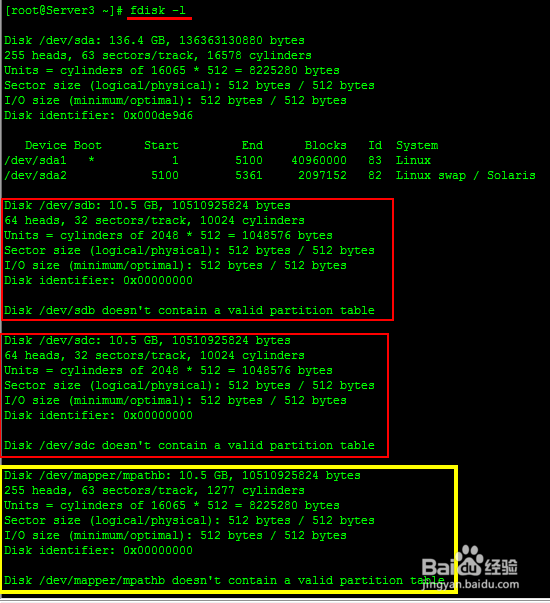
[root@Server3 ~]# fdisk -l
发现聚会后的磁盘
6、确保multipath daemon开机自动启动
[root@redhat1 ~]# chkconfig --list multipathd
[root@redhat1 ~]# chkconfig multipathd on
[root@redhat1 ~]# chkconfig --list multipathd
注意!有些做完了,重启以后发现磁盘没有了;那因为你没有设置为开机自动启动
7、Linux_Multipath的配置,全部完成;
