PSPad editor怎么设置插入模式光标为垂直线

 时间:2026-02-12 01:34:09

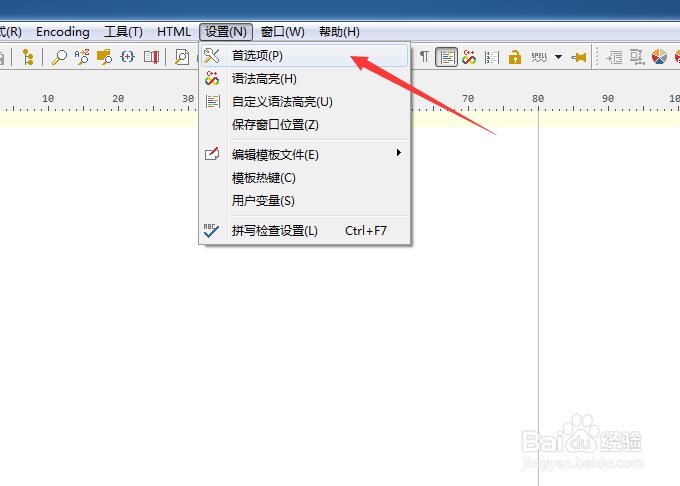
1、点击菜单中的设置菜单

PSPad editor怎么设置插入模式光标为垂直线

2、弹出了下拉菜单选中为首选项

PSPad editor怎么设置插入模式光标为垂直线

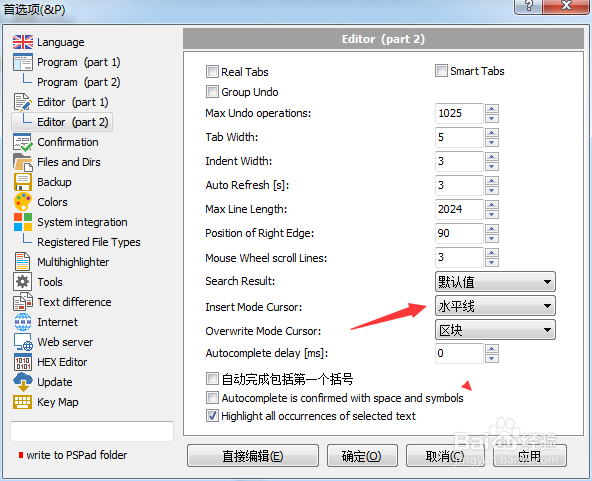
3、点击左侧中editor选项

PSPad editor怎么设置插入模式光标为垂直线

4、点击insert mode cursor选项

PSPad editor怎么设置插入模式光标为垂直线

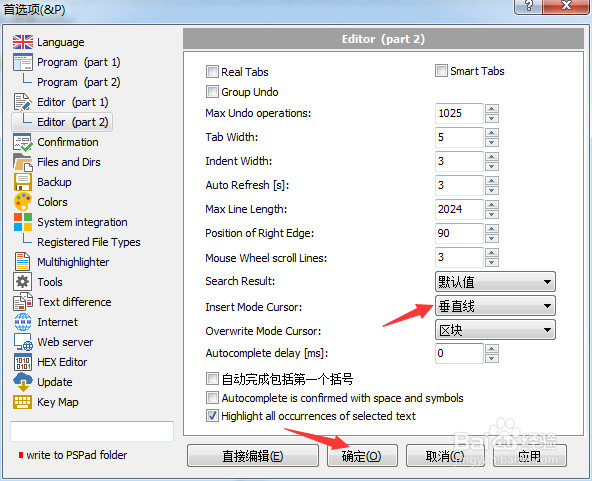
5、弹出了下拉菜单选择为垂直线

PSPad editor怎么设置插入模式光标为垂直线

6、选择为垂直线之后,点击确定

PSPad editor怎么设置插入模式光标为垂直线

  • PSPad editor怎么设置搜索结果为下
  • PSPad editor怎么设置自动完成延迟为1
  • PSPad editor怎么设置标签宽度
  • PSPad editor怎么设置循环浏览书签
  • PSPad editor怎么设置插入模式光标为半区块
  • 热门搜索
    旅游时跟妈妈有了关系 朔州旅游 生态农业旅游 日照旅游局 武汉的旅游景点 江西庐山旅游 旅游项目 江苏无锡旅游 四川成都旅游攻略 宁波象山旅游攻略