以观书法APP怎么注销账号

 时间:2026-05-06 02:31:48

1、第一步打开以观书法APP后,点击【我的】。

以观书法APP怎么注销账号

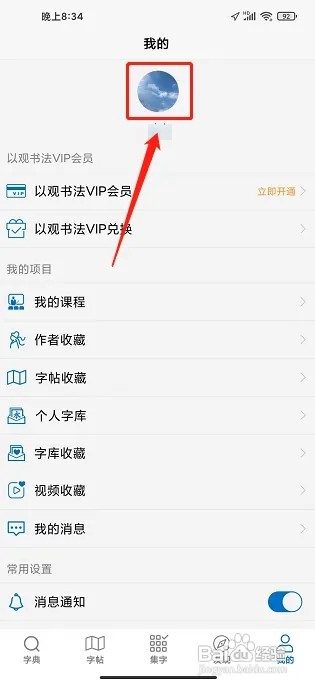
2、第二步进入我的窗口,点击【头像图标】。

以观书法APP怎么注销账号

3、进入用户中心窗口,点击【注销账号】。

以观书法APP怎么注销账号

4、第四步进入注销账号窗口,点击【确定注销】。

以观书法APP怎么注销账号

  • 以观书法APP怎么兑换VIP
  • 以观书法APP怎么注销账号?
  • 以观书法APP怎么注销账号
  • 以观书法APP怎么注销账号
  • 以观书法APP怎么兑换VIP
  • 热门搜索
    特价旅游 俄罗斯旅游注意事项 荆门旅游 新马泰旅游报价 同程网旅游网 成都旅游公司 雪乡旅游 日本旅游报价 云南旅游指南 黑龙江旅游景点大全