AIX设置EtherChannel(主备模式)逻辑网卡

 时间:2026-02-14 09:44:10

1、1、确认需要做EtherChannel的网卡

(1)网卡的位置信息

lscfg -vp|grep ent

注:根据输出,以及网卡在IO抽屉中的物理连线情况,最好规划连续分别在主备交换机上的两块网卡

2、2、配置EtherChannel 

(1)进入etherchannel设置菜单

#smitty etherchannel

   Add An EtherChannel / Link Aggregation

输出

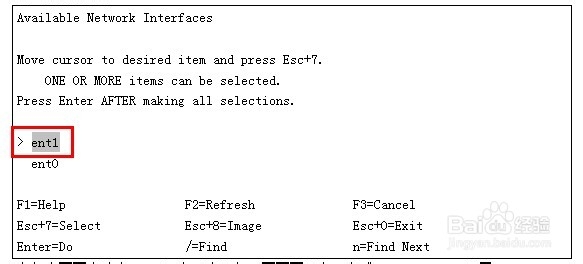
Available Network Interfaces                                        

Move cursor to desired item and press Esc+7.                            

    ONE OR MORE items can be selected.                                  

Press Enter AFTER making all selections.                              

> ent0                                                                 

 ent1                                                                 

F1=Help                 F2=Refresh              F3=Cancel               

Esc+7=Select            Esc+8=Image             Esc+0=Exit              

Enter=Do                /=Find                  n=Find Next

在如上画面中选中ent0回车,出现如下画面再回车,完成EtherChannel配置:

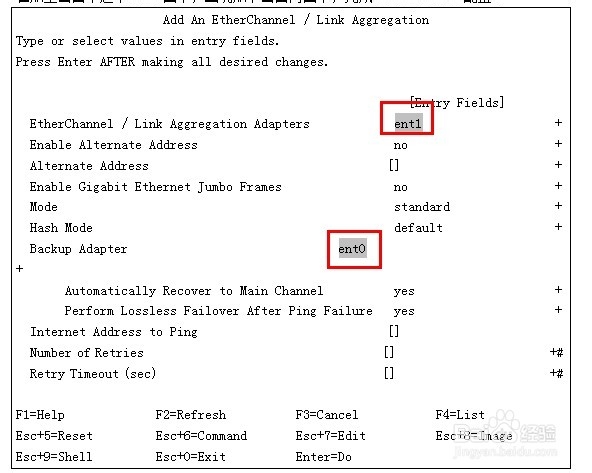
             Add An EtherChannel / Link Aggregation

Type or select values in entry fields.

Press Enter AFTER making all desired changes.

                                                        [Entry Fields]

  EtherChannel / Link Aggregation Adapters       ent0              +

  Enable Alternate Address                            no                     +

  Alternate Address                                  []                      +

  Enable Gigabit Ethernet Jumbo Frames                no                     +

  Mode                                                standard               +

  Hash Mode                                           default                +

  Backup Adapter                          ent1                      +

       Automatically Recover to Main Channel          yes                    +

       Perform Lossless Failover After Ping Failure   yes                    +

  Internet Address to Ping                           []

  Number of Retries                                  []                      +#

  Retry Timeout (sec)                                []                      +#

F1=Help             F2=Refresh          F3=Cancel           F4=List

Esc+5=Reset         Esc+6=Command       Esc+7=Edit          Esc+8=Image

Esc+9=Shell         Esc+0=Exit          Enter=Do

在如上画面中选中ent1和ent0回车,出现如下画面再回车,完成EtherChannel配置:

AIX设置EtherChannel(主备模式)逻辑网卡

AIX设置EtherChannel(主备模式)逻辑网卡

AIX设置EtherChannel(主备模式)逻辑网卡

3、3、设置IP地址

运行 #smitty mktcpip 命令,选出通过EtherChannel配置生成的网卡en2:

4、4、确认生成的逻辑网卡

#netstat -v en2

会看到详细的信息

  • 怎样用腾讯电脑管家去掉桌面图标小箭头
  • 如何解决win7“您可能没有权限使用网络资源”
  • Word2007如何设置多窗口页面
  • 如何基于64位Windows服务器快速搭建LDAP服务?
  • Serv-U 15 虚拟路径详解
  • 热门搜索
    出境旅游推荐 土耳其旅游签证 辽宁省旅游景点 中国旅游业发展现状 长沙旅游攻略两日游 西双版纳旅游线路 春节期间旅游 香港旅游团 那曲旅游 旅游一卡通