1、按Windows + R启动运行。
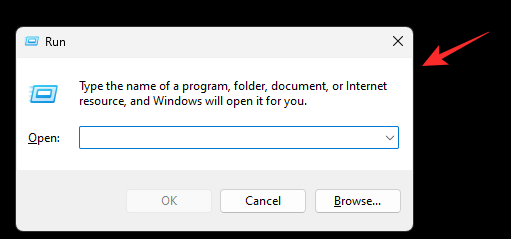
2、键入以下内容,然后按Enter或单击 OK。
regedit

3、双击 HKEY_USERS。
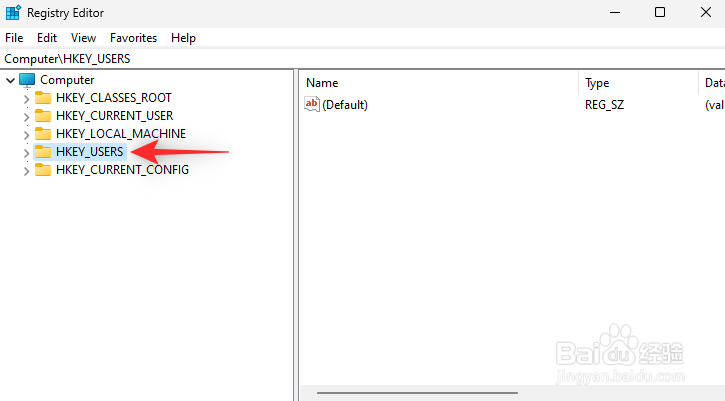
4、双击以1001结尾的倒数第二个值。

5、现在导航到所选值下方的路径。
SoftwareClassesLocal SettingsSoftwareMicrosoftWindowsCurrentVersionTrayNotify
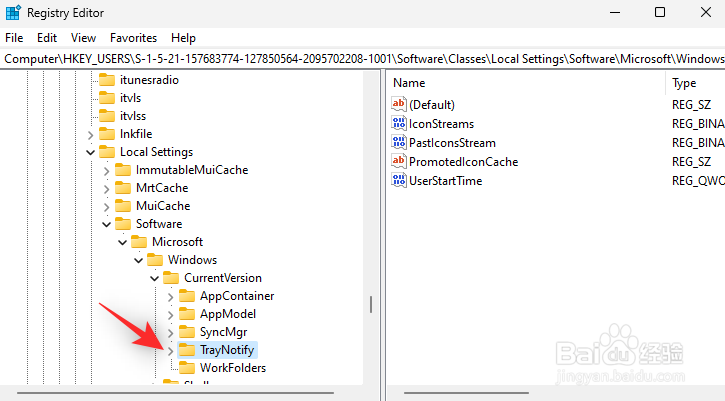
6、按住 键盘上的Ctrl 并选择右侧下面提到的二进制条目。

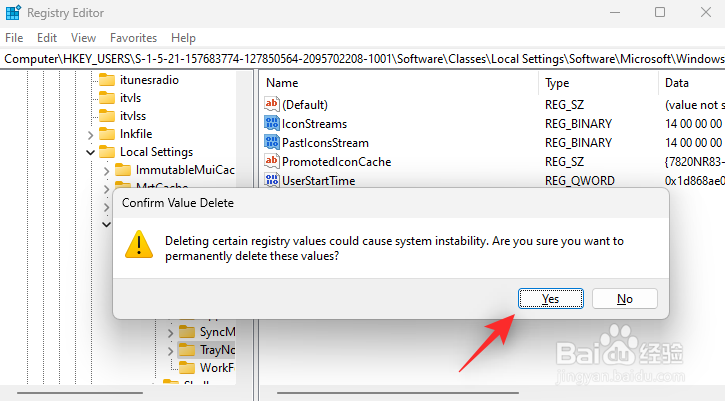
7、按 键盘上的Del 。单击 是确认您的选择。
时间:2026-05-01 22:14:00
1、按Windows + R启动运行。
2、键入以下内容,然后按Enter或单击 OK。
regedit
3、双击 HKEY_USERS。
4、双击以1001结尾的倒数第二个值。
5、现在导航到所选值下方的路径。
SoftwareClassesLocal SettingsSoftwareMicrosoftWindowsCurrentVersionTrayNotify
6、按住 键盘上的Ctrl 并选择右侧下面提到的二进制条目。
7、按 键盘上的Del 。单击 是确认您的选择。
