PotPlayer如何开启使用Microsoft默认调谐器

 时间:2026-05-02 12:59:25

1、最开始我们打开【PotPlayer】就可以找到【打开】下的【设备设置】

PotPlayer如何开启使用Microsoft默认调谐器

PotPlayer如何开启使用Microsoft默认调谐器

2、然后就可以找到【数字TV】属性单击按下

PotPlayer如何开启使用Microsoft默认调谐器

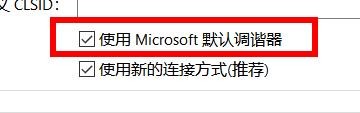
3、最后就可以往下拉找到【使用Microsoft默认调谐器】单击按下开启

PotPlayer如何开启使用Microsoft默认调谐器

  • PotPlayer如何开启当前播放列表
  • PotPlayer怎么不使用Microsoft默认调谐器
  • PotPlayer怎样开启默认使用剪贴板中可用地址
  • potplayer更改默认语言
  • PotPlayer如何开启桌面属性
  • 热门搜索
    海拉尔旅游 防城港旅游攻略 本溪旅游景点 携程旅游官网 中国旅游胜地 潮汕旅游 去云南旅游 周庄旅游 南京旅游攻略二日游 马来西亚旅游攻略