DataGrip怎么关闭显示方法分隔符

 时间:2026-02-15 17:22:57

1、首先,打开一个DataGrip的界面中

DataGrip怎么关闭显示方法分隔符

2、点击左上角中的 file 菜单

DataGrip怎么关闭显示方法分隔符

3、点击了file菜单之后,弹出了下拉菜单选择为 setting 选项

DataGrip怎么关闭显示方法分隔符

4、进入到了setting界面中,点击左侧中的 appearance 选项

DataGrip怎么关闭显示方法分隔符

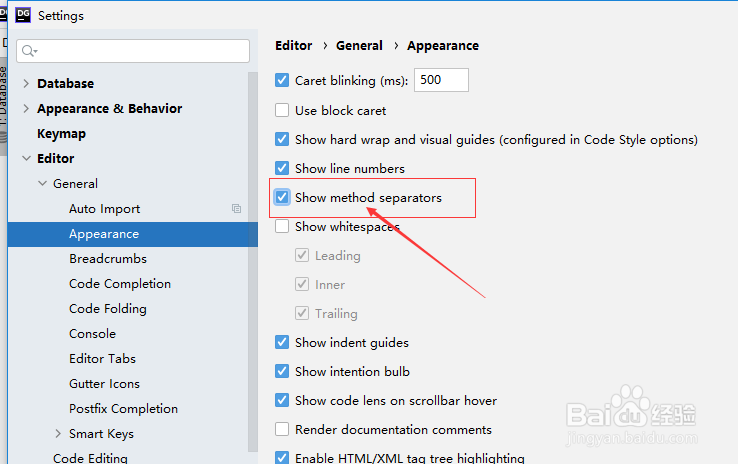
5、进入到了appearance 的界面中,去掉 show method separators 选项勾选 
DataGrip怎么关闭显示方法分隔符

6、去掉 show method separators 选项勾选 之后,点击 ok

DataGrip怎么关闭显示方法分隔符

1、点击左上角中的 file 菜单

选择为 setting 选项

点击左侧中的 appearance 选项

去掉 show method separators 选项勾选 

  • word分隔符怎么用
  • Word分隔符怎么用
  • SSMS怎么不自动突出显示分隔符
  • SSMS怎么自动突出显示分隔符
  • Android Studio如何显示方法分隔符
  • 热门搜索
    冬天适合旅游的地方 travelzoo旅游族 最爱四川旅游网 全域旅游规划 旅游学刊官网 韶关旅游网 福建泰宁旅游 适合老年人旅游的地方 时尚旅游杂志 乡村旅游案例