RHEL7安装grid报ohasd failed to start解决办法

 时间:2026-02-12 03:19:31

1、1.RHEL 7 安装grid11.2.0.4执行root.sh报错ohasd failed to start,如下图
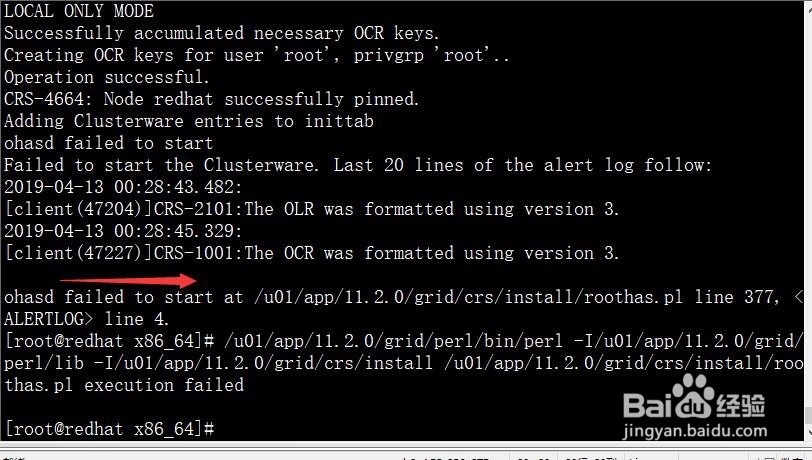
RHEL7安装grid报ohasd failed to start解决办法

2、2.报错的原因是redhat7中默认已经使用systemctl来启动服务,而11g中还是使用的init来启动服务,所以要新建ohas.service

RHEL7安装grid报ohasd failed to start解决办法

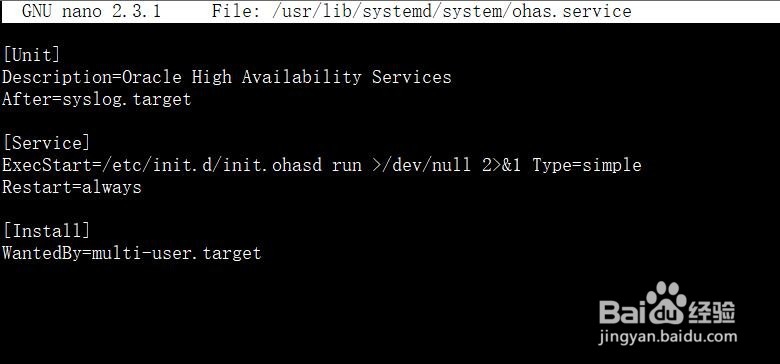
3、3.服务新建成功后在服务文件中添加如下图内容

RHEL7安装grid报ohasd failed to start解决办法

4、4.配置完成后,然后启动ohas.service服务,并设置开机自动启动服务

RHEL7安装grid报ohasd failed to start解决办法

5、5.启动完成后可直接查看服务状态,可以看到服务已经启动成功

RHEL7安装grid报ohasd failed to start解决办法

6、6.启动成功后再重新执行root脚本,可以看到已经不再报之前的错误了,直接安装成功

RHEL7安装grid报ohasd failed to start解决办法

RHEL7安装grid报ohasd failed to start解决办法

7、7.然后返回安装界面,点击ok按钮继续安装即可

RHEL7安装grid报ohasd failed to start解决办法

RHEL7安装grid报ohasd failed to start解决办法

  • 硬盘引导改为gpt模式
  • MaxDos工具箱硬盘分区工具教程
  • BAT批处理如何实现程序的自动安装
  • Windows11如何查看疑难解答
  • PE系统使用DG分区工具实现硬盘坏道检测
  • 热门搜索
    山西省旅游地图 盘锦旅游景点大全 旅游业可持续发展 最近国内旅游报价 花莲旅游攻略 包车旅游 台湾旅游价格 枫泾旅游 南湖旅游 郑州市旅游