PowerShape怎么关闭转换全部曲面为powersurface

 时间:2026-04-21 18:45:04

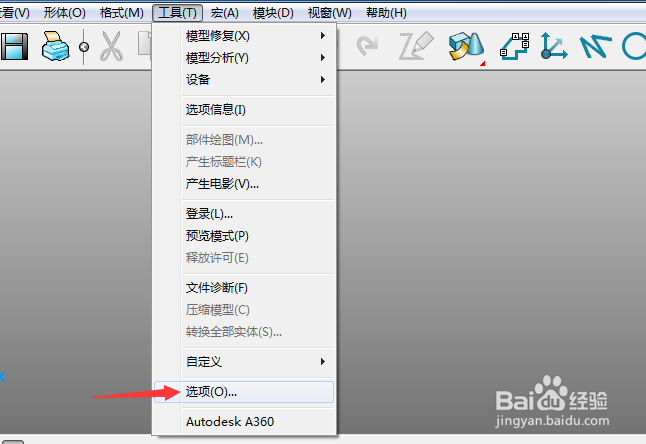
1、首先,点击菜单中的工具菜单,弹出了下拉菜单选中为选项


PowerShape怎么关闭转换全部曲面为powersurface

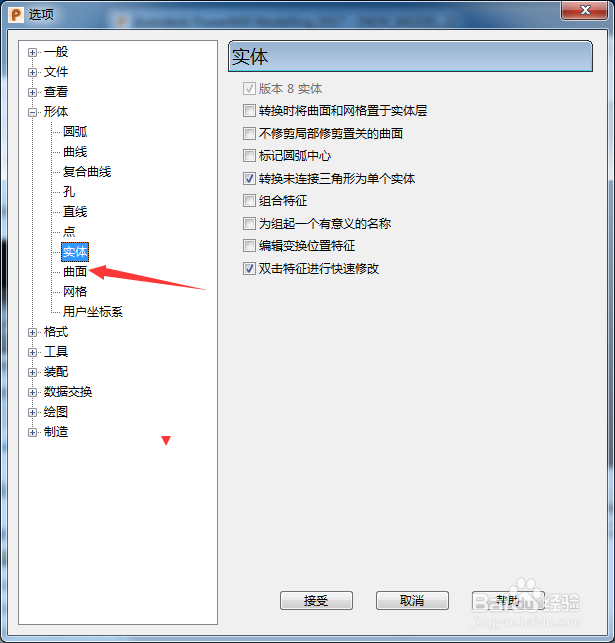
2、点击左侧中曲面选项


PowerShape怎么关闭转换全部曲面为powersurface

3、去掉勾选上转换全部曲面为powersurface选项


PowerShape怎么关闭转换全部曲面为powersurface

4、去掉勾选上转换全部曲面为powersurface选项之后,点击接受按钮
PowerShape怎么关闭转换全部曲面为powersurface

  • Solidworks中怎么调出工具栏
  • SW 2019如何设置分割周期面
  • Solidworks如何设置边线法兰为虚拟交点的折弯
  • SW如何设定边角特定缝隙
  • Solidworks2016软件怎么利用异型孔向导设计孔?
  • 热门搜索
    去云南旅游注意事项 旅游安全协议书 深圳文体旅游局官网 厦门土楼旅游攻略 去韩国旅游签证怎么办 辽宁兴城旅游 旅游实习报告 塞舌尔旅游报价 中老年旅游 南普陀寺旅游攻略